 DJ
472152801f
DJ
472152801f
Add default values for sizes.elevationMargin, font.family.numbers, and
font.variableAxes.main to prevent undefined property errors when these
aren't specified in user config.

Fix Revealer widget using contentChildren instead of children, which
caused content items to not be detected properly.

hypr-lens



Screen capture, OCR, and visual search utilities for Hyprland
Features • Installation • Usage • Configuration • Security • Troubleshooting • Wiki • Development • Changelog
A standalone, portable toolkit extracted and refactored from end-4's dotfiles that provides a polished region selector UI with window detection, screenshot capture, OCR text extraction, Google Lens integration, and screen recording.
Demo
https://github.com/user-attachments/assets/0191f340-a53d-498d-b978-56efb04c6a99
https://github.com/user-attachments/assets/1ec9ff6b-895c-491a-8f31-b8178a137425
https://github.com/user-attachments/assets/02a46c78-d7ed-49ad-b773-82db2b22877f
Features
| Feature | Description |
|---|---|
| 📸 Region Screenshot | Select any region and copy to clipboard |
| 🪟 Window Detection | Click on detected windows/layers for quick capture |
| 🔍 Content Detection | OpenCV-powered region detection within screenshots |
| 📝 OCR Text Extraction | Extract text from selected regions using Tesseract |
| 🔎 Image Search | Copy to clipboard + open Google Lens (see note) |
| 🎬 Screen Recording | Record selected regions with optional audio |
| 🎨 Color Picker | Pick colors from anywhere on screen |
Compatibility
⚠️ Arch Linux Only
This project is developed and tested exclusively on Arch Linux. The installer uses
pacman/paru/yayand assumes an Arch-based system.Other distros (NixOS, Fedora, etc.): Manual installation is possible by installing the dependencies through your package manager and copying the files to the appropriate locations. The installer script is Arch-centric and won't work out of the box, but the QML components themselves are distro-agnostic. PRs adding support for other package managers are welcome!
Prerequisites
💡 Tip: The installer automatically detects missing dependencies and offers to install them via
pacman/paru/yay. You can skip manual installation and let the installer handle it!
Required
| Tool | Purpose | Install |
|---|---|---|
| quickshell | QML shell runtime | paru -S quickshell-git |
| grim | Screenshot capture | pacman -S grim |
| slurp | Region selection fallback | pacman -S slurp |
| wl-copy | Clipboard | pacman -S wl-clipboard |
| jq | JSON parsing | pacman -S jq |
| notify-send | Notifications | pacman -S libnotify |
| magick | Image processing | pacman -S imagemagick |
Optional
| Tool | Purpose | Install |
|---|---|---|
| tesseract | OCR text extraction | pacman -S tesseract tesseract-data-eng |
| swappy | Screenshot editing | pacman -S swappy |
| wf-recorder | Screen recording | pacman -S wf-recorder |
| hyprpicker | Color picker | pacman -S hyprpicker |
| python3 + opencv | Content detection | Installer sets up venv |
| matugen | Dynamic theming | paru -S matugen-bin |
Version Requirements
| Component | Minimum | Notes |
|---|---|---|
| quickshell | 0.1.0+ | Required for GlobalShortcut, IpcHandler |
| Hyprland | 0.40.0+ | Required for hyprctl clients -j format |
| ImageMagick | 7.0+ | Uses magick command (not legacy convert) |
| grim | 1.4+ | Wayland screenshot capture |
| wf-recorder | 0.4+ | Wayland screen recording |
Installation
# Clone the repository
git clone https://github.com/thesleepingsage/hypr-lens.git
cd hypr-lens

# Run the installer
./hypr-lens-install.sh

# Or preview first with dry-run
./hypr-lens-install.sh --dry-run
What the Installer Does
| Step | Location |
|---|---|
| QML modules | ~/.config/quickshell/hypr-lens/ |
| Scripts | ~/.local/share/hypr-lens/scripts/ |
| Python venv | ~/.local/share/hypr-lens/venv/ (optional) |
| Default config | ~/.config/hypr-lens/config.json |
Updating
Pull the latest changes and run the update command to refresh installed files:
git pull
./hypr-lens-install.sh --update
This preserves your existing config and skips most setup prompts.
💡 Integration Recovery: If your
shell.qmlwas overwritten (e.g., after updating your dotfiles), the update command will detect the missing integration and offer to fix it automatically.
Starting hypr-lens
Option 1: Integrated (recommended)
The installer can automatically integrate hypr-lens into your existing shell.qml:
- Creates a timestamped backup:
shell.qml.hypr-lens-backup.<timestamp> - Adds the import and RegionSelector component
- Validates syntax before completing
Or integrate manually by adding to your ~/.config/quickshell/shell.qml:
// At the top with your other imports:
import "./hypr-lens/modules/regionSelector"

// Inside your root component (Scope, ShellRoot, etc.):
RegionSelector {}
Then restart quickshell:
killall quickshell; quickshell &
Option 2: Standalone
Add to your Hyprland startup (e.g., execs.conf):
exec-once = qs --path ~/.config/quickshell/hypr-lens &
To start immediately:
qs --path ~/.config/quickshell/hypr-lens &
Adding Keybinds
Copy the keybinds from keybinds.example.conf to your Hyprland config:
# Example: append to your keybinds file
cat keybinds.example.conf >> ~/.config/hypr/your-keybinds.conf

# Then reload Hyprland
hyprctl reload
Usage
Default Keybinds
| Keybind | Action |
|---|---|
Super+Shift+S |
Region screenshot (copy to clipboard) |
Super+Shift+A |
Image search (Google Lens) |
Super+Shift+X |
OCR text extraction |
Super+Shift+R |
Region recording |
Super+Shift+Alt+R |
Recording with audio |
Super+Shift+C |
Color picker |
Print |
Quick fullscreen screenshot |
Quick Start
- Press
Super+Shift+Sto open the region selector - Detected windows appear with colored borders
- Click a window to capture it, or drag to select a custom region
- The screenshot is copied to your clipboard
- Right-click (if swappy installed) opens the editor
Image Search Note
The Image Search feature (Super+Shift+A) works by:
- Capturing your selected region
- Copying the image to your clipboard
- Opening Google Lens in your browser
You then paste (Ctrl+V) the image into Google Lens to search.
Not a fan of this workflow? No problem — just use the regular screenshot (
Super+Shift+S) and search with your preferred method.
IPC Commands
Control hypr-lens programmatically via quickshell IPC:
qs ipc call region screenshot
qs ipc call region search
qs ipc call region ocr
qs ipc call region record
qs ipc call region recordWithSound
For standalone mode, use:
qs --path ~/.config/quickshell/hypr-lens ipc call ...
See MANUAL.md for detailed IPC documentation.
Configuration
Config file: ~/.config/hypr-lens/config.json
Full Configuration Reference
{
  // ─── Appearance ─────────────────────────────────────────────
  "appearance": {
    "matugenPath": "",              // Path to matugen.json (empty = default)
    "ripple": {
      "usePrimaryColor": true,      // true = accent color, false = gray
      "colorMixRatio": 0.65,        // 0.0 = bold, 1.0 = invisible
      "solidRadius": 0.45,          // Solid color extent (0.0-1.0)
      "fadeRadius": 0.7             // Fade end point (0.0-1.0)
    }
  },

  // ─── Screenshots ────────────────────────────────────────────
  "screenSnip": {
    "savePath": ""                  // Empty = clipboard only
  },

  // ─── Screen Recording ───────────────────────────────────────
  "screenRecord": {
    "savePath": ""                  // Empty = ~/Videos
  },

  // ─── OCR ────────────────────────────────────────────────────
  "ocr": {
    "useCircleSelection": false     // true = circle, false = rectangle
  },

  // ─── Image Search ───────────────────────────────────────────
  "search": {
    "imageSearch": {
      "imageSearchEngineBaseUrl": "https://lens.google.com/uploadbyurl?url=",
      "useCircleSelection": false
    }
  },

  // ─── Region Selector ────────────────────────────────────────
  "regionSelector": {
    "targetRegions": {
      "windows": true,              // Detect window boundaries
      "layers": false,              // Detect Hyprland layers
      "content": true,              // OpenCV content detection
      "showLabel": false,           // Show labels on regions
      "opacity": 0.3,               // Highlight opacity (0.0-1.0)
      "contentRegionOpacity": 0.8,
      "selectionPadding": 5         // Extra pixels around regions
    },
    "rect": {
      "showAimLines": true          // Show crosshair when drawing
    },
    "circle": {
      "strokeWidth": 6,             // Outline thickness
      "padding": 10                 // Extra space around selection
    }
  }
}
Theming
hypr-lens supports dynamic theming via matugen, a Material You color generation tool.
How it works
- hypr-lens watches
~/.config/quickshell/matugen.jsonfor color changes - When you change your wallpaper (and matugen regenerates colors), hypr-lens automatically updates
- Without matugen, hypr-lens uses a default blue theme
Setup
Setting up matugen
If you're using matugen with quickshell (e.g., from dots-hyprland), theming works automatically - hypr-lens reads the same matugen.json file.
If you want to set up matugen standalone:
- Install matugen:
paru -S matugen-bin - Create a template at
~/.config/matugen/templates/quickshell.json:{ "primary": "@{primary}", "on_primary": "@{on_primary}", "surface": "@{surface}", "surface_container": "@{surface_container}" } - Configure matugen to output to
~/.config/quickshell/matugen.json - Run
matugen image /path/to/wallpaper.jpgto generate colors
Uninstall
./hypr-lens-install.sh --uninstall
Note: Remember to remove keybinds from your Hyprland config manually.
Security
Concerned about what the installer does? We've got you covered.
| Aspect | Status |
|---|---|
| Root/sudo | Optional - only if you choose auto-install packages |
| Files modified | ~/.config/ and ~/.local/share/ only |
| Network access | None - no downloads, no telemetry |
| Reversible | Yes - --uninstall + automatic backups |
Preview before running:
./hypr-lens-install.sh --dry-run
📄 Full Security Audit → — detailed breakdown with line numbers for verification.
Troubleshooting
"quickshell: command not found"
Install quickshell from AUR:
paru -S quickshell-git
Screenshots not copying to clipboard
Ensure wl-copy is installed and working:
echo test | wl-copy
OCR returns empty text
- Install tesseract language data:
pacman -S tesseract-data-eng - For other languages:
pacman -S tesseract-data-<lang>
Content detection not working
- Ensure Python venv was set up during install
- Verify with:
~/.local/share/hypr-lens/venv/bin/python -c "import cv2; print('OK')"
Recording not working
- Install wf-recorder:
pacman -S wf-recorder - Check if another recording is active:
pkill wf-recorder
Credits
- UI components from dots-hyprland by end-4
- Built on quickshell
Contributing
Contributions are welcome! Please feel free to submit a Pull Request.
- Fork the repository
- Create your feature branch (
git checkout -b feature/amazing-feature) - Commit your changes (
git commit -m 'Add amazing feature') - Push to the branch (
git push origin feature/amazing-feature) - Open a Pull Request
Related Projects
- hypr-overview - macOS Mission Control-ish-style workspace overview for Hyprland. Inspired by and extracted from end-4's dots-hyprland, with refactoring and additional features.
License
This project is licensed under the GPL-3.0 License - see the LICENSE file for details.
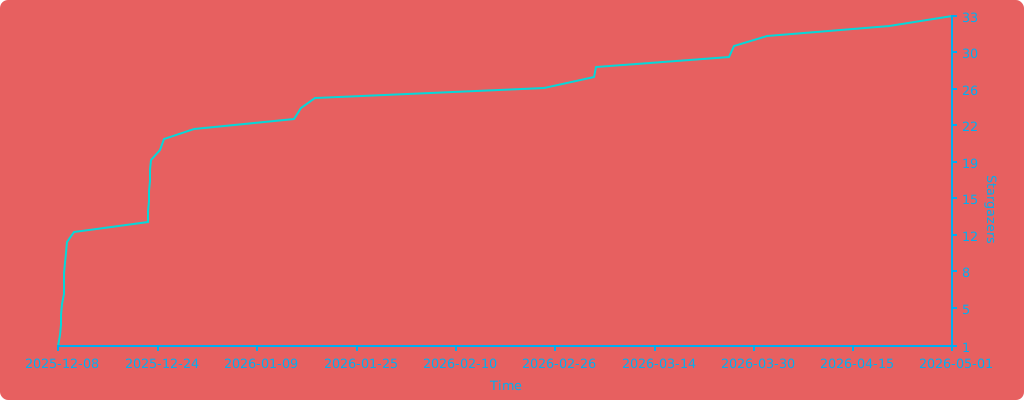
Stargazers over time